Membuat Halaman Database VB 6

Membuat halaman database sangat dibutuhkan dalam pengolaan database yang cukup besar. Apabila kita menemukan suatu project demikian apa yang bisa lakukan?. Bagi anda yang mengetahui atau sudah mahir dalam programing VB 6 tentu saja sudah mengetahui solusinya. Berikut saya sharing atau berikan suatu "Tips Membuat Halaman Database atau Page Paging" dengan menggunakan database "Microsoft Access". 

Option Explicit
Dim mykoneksi As Connection
Dim WithEvents tb_1 As Recordset
Dim WithEvents tb_2 As Recordset
Dim record As Integer
Dim field As Integer
Dim page As Integer
Dim jumlah_per_halaman As Integer
Dim eop As Integer
Dim j As Integer

Private Sub cbopage_Click()
  Dim i As Integer
  Dim tempBottom As Integer
  Dim tempTop As Integer
  If cbopage.Text > 1 And _
     cbopage.Text < tb_1.PageCount Then cmdprev.Enabled = True: cmdnext.Enabled = True
  If cbopage.Text = tb_1.PageCount Then cmdprev.Enabled = True: cmdnext.Enabled = False
  If cbopage.Text <= 1 Then cmdprev.Enabled = False: cmdnext.Enabled = True
  If cbopage.ListCount = 1 Then cmdprev.Enabled = False: cmdnext.Enabled = False  
  If cbopage.Text = "1" Then
    j = 0
    tb_1.MoveFirst
    For i = 1 To jumlah_per_halaman
      j = j + 1
      tb_1.MoveNext
      If tb_1.EOF Then Exit For
    Next i
  Else
    j = 0
    tb_1.MoveFirst
    eop = cbopage.Text * jumlah_per_halaman
    tb_1.Move eop - jumlah_per_halaman
    For i = 1 To jumlah_per_halaman
      j = j + 1
      tb_1.MoveNext
      If tb_1.EOF Then Exit For
    Next i
  End If
  tempBottom = (cbopage * jumlah_per_halaman) - (jumlah_per_halaman - 1)
  tempTop = ((cbopage * jumlah_per_halaman) - (jumlah_per_halaman - 1)) + (j - 1)
  Set tb_2 = New Recordset
  tb_2.Open "SELECT * FROM table1 WHERE no_urut>=" _
                 & tempBottom & " AND no_urut<=" & tempTop & "", _
                 mykoneksi, adOpenDynamic, adLockOptimistic
  Set DataGrid1.DataSource = tb_2.DataSource
  record = tb_2.RecordCount
  field = tb_2.Fields.Count
  DoEvents
End Sub

Private Sub cbo_perpage_Click()
  Dim i As Integer
  jumlah_per_halaman = cbo_perpage.Text
  tb_1.PageSize = jumlah_per_halaman
  page = tb_1.PageCount
  cbopage.Clear
  For i = 1 To page
     cbopage.AddItem i
  Next i
  cbopage.Text = cbopage.List(0)
End Sub

Private Sub cmdCLOSE_Click()
 Unload Me
End Sub

Private Sub cmdnext_Click()
  cbopage.Text = cbopage.Text + 1
  If cbopage.Text > 1 Then cmdprev.Enabled = True
  If cbopage.Text >= tb_1.PageCount Then cmdnext.Enabled = False: cmdprev.SetFocus
End Sub

Private Sub cmdprev_Click()
  cbopage.Text = cbopage.Text - 1
  If cbopage.Text > 1 Then cmdprev.Enabled = True: cmdprev.SetFocus
  If cbopage.Text <= 1 Then cmdprev.Enabled = False: cmdnext.Enabled = True
End Sub

Private Sub Form_Load()
Dim i As Integer
  Set mykoneksi = New Connection
  mykoneksi.CursorLocation = adUseClient
  mykoneksi.Open "PROVIDER=MSDataShape;Data PROVIDER=" & _
          "Microsoft.Jet.OLEDB.4.0;Data Source=" _
          & App.Path & "\db1.mdb;"
   
  Set tb_1 = New Recordset
  tb_1.Open "SELECT * FROM table1", mykoneksi
    
  For i = 10 To 35 Step 10
     cbo_perpage.AddItem i
  Next i
  cbo_perpage.Text = cbo_perpage.List(0)
  jumlah_per_halaman = cbo_perpage.List(0)
  tb_1.PageSize = jumlah_per_halaman
  page = tb_1.PageCount
  cmdprev.Enabled = False
  cmdnext.Enabled = True
  Exit Sub
Pesan:
  MsgBox Err.Number & " - " & Err.Description
  End
End Sub
Contoh Kode membuat halaman vb 6 diatas masih sederhana dan bisa dikembangkan sesuai kebutuhan kita.  NB : "mungkin ada rekan-rekan yang ahli mohon di share... terima kasih".

Download Source disini.

Membuat Animasi Picture

Membuat aplikasi seringkali kita ingin agar aplikasi kita kelihatan menarik misalnya about me, loading form atau halaman pembuka. berikut saya berikan contoh Membuat Animasi Picture VB 6 dan bisa dikembangkan sesuai kebutuhan kita.
Contoh tampilan latihan membuat animasi picture seperti di bawah ini :
Option Explicit
Private Declare Sub Sleep Lib "kernel32.dll" (ByVal dwMilliseconds As Long)
Dim flipped As Integer  ' bit field

Private Sub Form_Load()

    ' we need to make the form visible, first
    Show
    DoEvents
    ' then we can show the image (this cause a refresh)
    cboDissolve.ListIndex = 0
End Sub

Private Sub cboZoom_Click()

    cmdShow.Value = True
End Sub

Private Sub chkTile_Click()

    cmdShow.Value = True
End Sub

Private Sub cboDissolve_Click()

    fraZoom.Enabled = (cboDissolve.ListIndex = 0)
    cmdHorizontal.Enabled = (cboDissolve.ListIndex = 0)
    cmdVertical.Enabled = (cboDissolve.ListIndex = 0)
    cmdBoth.Enabled = (cboDissolve.ListIndex = 0)
    cmdShow.Value = True
End Sub

Private Sub cmdShow_Click()

    If cboDissolve.ListIndex = 0 Then
        ShowImage
    Else
        DissolveImage
    End If
    flipped = 0
End Sub

Sub ShowImage()

    ' show the hidden image
    Dim destWidth As Single, destHeight As Single
    Dim destX As Single, destY As Single
    Dim stepX As Single, stepY As Single
    
    ' determine zoom factor
    Select Case cboZoom.ListIndex
        Case cboZoom.ListCount - 4
            ' fit width
            destWidth = picDest.ScaleWidth
            destHeight = picSource.ScaleHeight * (destWidth / picSource.ScaleWidth)
        Case cboZoom.ListCount - 3
            ' fit height
            destHeight = picDest.ScaleHeight
            destWidth = picSource.ScaleWidth * (destHeight / picSource.ScaleWidth)
        Case cboZoom.ListCount - 2
            ' fit page (no distorsion)
            destWidth = picDest.ScaleWidth
            destHeight = picDest.ScaleHeight
            If destWidth / picSource.ScaleWidth < destHeight / picDest.ScaleHeight Then
                ' fit width, adjust height
                destHeight = picSource.ScaleHeight * (destWidth / picSource.ScaleWidth)
            Else
                ' fit height, adjust width
                destWidth = picSource.ScaleWidth * (destHeight / picSource.ScaleWidth)
            End If
        Case cboZoom.ListCount - 1
            ' fit page (distorsion)
            destWidth = picDest.ScaleWidth
            destHeight = picDest.ScaleHeight
        Case Else
            On Error Resume Next
            destWidth = picSource.ScaleWidth * Val(cboZoom) / 100
            destHeight = picSource.ScaleHeight * Val(cboZoom) / 100
            If Err Then Exit Sub
    End Select
    
    picDest.Cls
    
    If chkTile.Value = vbChecked Then
        ' tile images
        For destX = 0 To picDest.ScaleWidth Step destWidth
            For destY = 0 To picDest.ScaleHeight Step destHeight
                picDest.PaintPicture picSource.Picture, destX, destY, destWidth, destHeight
            Next
        Next
    Else
        ' simple copy
        picDest.PaintPicture picSource.Picture, 0, 0, destWidth, destHeight
    End If
End Sub

Sub DissolveImage()

    ' show the hidden image
    Dim srcWidth As Single, srcHeight As Single
    Dim srcX As Single, srcY As Single
    Dim destWidth As Single, destHeight As Single
    Dim destX As Single, destY As Single
    Dim stepX As Single, stepY As Single
    Dim i As Integer
    
    Const DISSOLVE_STEPS = 20
    
    ' most routine below use these values
    srcWidth = picSource.ScaleWidth
    srcHeight = picSource.ScaleHeight
        
    stepX = srcWidth / DISSOLVE_STEPS
    stepY = srcHeight / DISSOLVE_STEPS
    
    picDest.Cls
    
    Select Case cboDissolve.ListIndex
        Case 1
            ' Scroll from Left
            srcX = srcWidth
            For i = 1 To DISSOLVE_STEPS
                srcX = srcX - stepX
                picDest.PaintPicture picSource.Picture, 0, 0, , , srcX, 0
                RefreshAndDelay
            Next
        Case 2
            ' Scroll from right
            destX = srcWidth
            For i = 1 To DISSOLVE_STEPS
                destX = destX - stepX
                picDest.PaintPicture picSource.Picture, destX, 0, srcWidth - destX, , , , srcWidth - destX
                RefreshAndDelay
            Next
        Case 3
            ' Scroll from Top
            srcY = srcHeight
            For i = 1 To DISSOLVE_STEPS
                srcY = srcY - stepY
                picDest.PaintPicture picSource.Picture, 0, 0, , , 0, srcY
                RefreshAndDelay
            Next
        Case 4
            ' Scroll from bottom
            destY = srcHeight
            For i = 1 To DISSOLVE_STEPS
                destY = destY - stepY
                picDest.PaintPicture picSource.Picture, 0, destY, , , , , , srcHeight - destY
                RefreshAndDelay
            Next
            
        Case 5
            ' Roll from Left
            destWidth = 0
            For i = 1 To DISSOLVE_STEPS
                destWidth = destWidth + stepX
                picDest.PaintPicture picSource.Picture, 0, 0, , , 0, 0, destWidth
                RefreshAndDelay
            Next
        Case 6
            ' Roll from right
            destX = srcWidth
            For i = 1 To DISSOLVE_STEPS
                destX = destX - stepX
                picDest.PaintPicture picSource.Picture, destX, 0, , , destX, 0, srcWidth - destX
                RefreshAndDelay
            Next
        Case 7
            ' Roll from Top
            destHeight = 0
            For i = 1 To DISSOLVE_STEPS
                destHeight = destHeight + stepY
                picDest.PaintPicture picSource.Picture, 0, 0, , , 0, 0, , destHeight
                RefreshAndDelay
            Next
        Case 8
            ' Roll from bottom
            destY = srcHeight
            For i = 1 To DISSOLVE_STEPS
                destY = destY - stepY
                picDest.PaintPicture picSource.Picture, 0, destY, , , 0, destY, , srcHeight - destY
                RefreshAndDelay
            Next
        Case 9
            ' explode
            destX = srcWidth / 2
            destY = srcHeight / 2
            srcWidth = 0
            srcHeight = 0
            For i = 1 To DISSOLVE_STEPS
                destX = destX - stepX / 2
                destY = destY - stepY / 2
                srcWidth = srcWidth + stepX
                srcHeight = srcHeight + stepY
                picDest.PaintPicture picSource.Picture, destX, destY, , , destX, destY, srcWidth, srcHeight
                RefreshAndDelay
            Next
        Case 10
            ' mosaic
            ' first, prepare the matrix of the (X,Y) coordinates
            ' for all the tiles
            Dim xy(DISSOLVE_STEPS * DISSOLVE_STEPS, 1) As ShiftConstants
            Dim kx As Integer, ky As Integer, ndx As Integer
            destX = 0
            For kx = 1 To DISSOLVE_STEPS
                destY = 0
                For ky = 1 To DISSOLVE_STEPS
                    i = i + 1
                    xy(i, 0) = destX
                    xy(i, 1) = destY
                    destY = destY + stepY
                Next
                destX = destX + stepX
            Next
            ' this loop picks up a random tile, draws it and then
            ' deletes it from the xy() array so that it can't be
            ' selected any more
            For ndx = UBound(xy) To 1 Step -1
                ' draw the tile
                i = Int(Rnd * ndx + 1)
                destX = xy(i, 0)
                destY = xy(i, 1)
                picDest.PaintPicture picSource.Picture, destX, destY, , , destX, destY, stepX, stepY
                ' delete it from xy() - actually it just replace it
                ' with the last item in the array
                xy(i, 0) = xy(ndx, 0)
                xy(i, 1) = xy(ndx, 1)
            Next
    End Select

End Sub


Private Sub cmdHorizontal_Click()

    ' flip the image horizontally
    flipped = flipped Xor 1
    ShowFlippedImage
End Sub

Private Sub cmdVertical_Click()

    ' flip the image vertically
    flipped = flipped Xor 2
    ShowFlippedImage
End Sub

Private Sub cmdBoth_Click()

    ' flip the image on both axis
    flipped = flipped Xor 3
    ShowFlippedImage
End Sub

Sub ShowFlippedImage()

    picDest.Cls
    Select Case flipped
        Case 0
            picDest.PaintPicture picSource.Picture, 0, 0
        Case 1
            ' flip the image horizontally
            picDest.PaintPicture picSource.Picture, picSource.ScaleWidth, 0, -picSource.ScaleWidth
        Case 2
            ' flip the image vertically
            picDest.PaintPicture picSource.Picture, 0, picSource.ScaleHeight, , -picSource.ScaleHeight
        Case 3
            ' flip the image on both axis
            picDest.PaintPicture picSource.Picture, picSource.ScaleWidth, picSource.ScaleHeight, -picSource.ScaleWidth, -picSource.ScaleHeight
    End Select
End Sub

Sub RefreshAndDelay()

    'Refresh
    Sleep 50
End Sub

Kode diatas hanya sederhana, saya dapat dari internet melalui Om Googleee. dan telah membantu saya membuat aplikasi-aplikasi sederhan.

Source Code

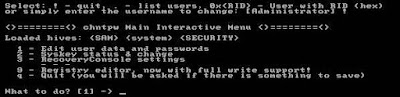
Lupa Password Administrator Windows

Kalau suatu saat kita lupa user password di windows (xp, vista, 7), itu tidak terlalu masalah, karena masih bisa direset menggunakan account administrator , tetapi kalau yang lupa adalah password administratornya, ini baru masalah karena sudah barang tentu tidak bisa direset menggunakan account user.
Ada cara alternatif untuk mengatasi kalau kita lupa password administrator, sebelum menggunakan jalan terakhir yaitu menginstal ulang windowsnya, caranya yaitu dengan me-reset password menggunakan tool berikut:
  • Silakan download disini softwarenya, ukurannya sekitar 3,6 MB, (suport windows xp, vista dan windows 7)
  • Extract file zipnya, di dalamnya ada file iso (cd080802.iso), kemudian copykan (burn) ke CDR blank menggunakan software burning seperti  nero. Gunakan pilihan Burn image to disc. 
  • Untuk windows XP  setelah diextract file zipnya , untuk burning ke CD tingal klik kanan pada file ISOnya pilih Burn Image to Disc ( tanpa perlu memakai software tambahan).
  • Booting komputer menggunakan CD yang telah kita buat (set komputer (bios) agar first bootnya ke CD/DVD drive).
Untuk Microsoft Windows yang terinstall secara standard (yang umum), sampai step/urutan ke 7 kita tinggal tekan enter enter.
Berikut Langkah-langkahnya :
1. Tampilan pertama seperti ini

2. Tekan Enter,  tunggu loading beberapa saat

3. Pilih Partisi dimana windows terinstall, atau langsung Tekan Enter

4. Pilih  windows registry directory atau langsung Tekan Enter

5. Tekan Enter ( Pilihan :Pasword Reset )

6. Tekan Enter (User data and Password )

7. Tekan Enter (pilihan : administrator account)

8. Ketik   1  (angka satu ) kemudian tekan Enter  ( memilihclear / blank password )

9. Ketik  !  (tanda seru) kemudian tekan Enter (untuk keluar)

10. Ketik q  kemudian tekan Enter (untuk keluar)

11. Ketik y kemudian tekan Enter untuk menyimpan.

12. ketik n kemudian tekan enter untuk keluar

13. Keluarkan CD, tekan tombol Control + Alt + Del Untuk Rebootkomputer Account administrator saat ini sudah tidak memakai password (blank ).
Demikian semoga bermanfaat.

Menampilkan Gambar VB

Berikut ini saya akan bagikan source code untuk Menampilkan Gambar/Image Visual Basic, mudah-mudahan dapat membantu bagi penggemar programing visual basic. Source code ini hanya sederhana dan anda bisa kembangkan sesuai kebutuhan. 
Tampilannya seperti gambar berikut:


Dalam source kode diatas ada fungsi menampilkan data dengan memilih drive. berikut source codenya:


Option Explicit

Private Sub Form_Load()
    Drive1.Drive = "c:"
    Dir1.Path = "c:\windows"
    File1.Pattern = "*.bmp;*.dib;*.wmf;*.emf;*.gif;*.jpg"
End Sub

Private Sub Drive1_Change()
    Dir1.Path = Left$(Drive1.Drive, 1) & ":\"
End Sub

Private Sub Dir1_Change()
    File1.Path = Dir1.Path
End Sub

Private Sub File1_Click()
    LoadImage File1.Path & IIf(Right$(File1.Path, 1) <> "\", "\", "") &     File1.filename
End Sub

Private Sub Form_Resize()
    On Error Resume Next
    File1.Height = ScaleHeight - File1.Top
    picPreview.Move picPreview.Left, picPreview.Top, ScaleWidth - picPreview.Left, ScaleHeight - picPreview.Top
    ShowImage
End Sub

Private Sub optActual_Click()
    ShowImage
End Sub

Private Sub optStretch_Click()
    ShowImage
End Sub

Private Sub optTile_Click()
    ShowImage
End Sub

Sub LoadImage(filename As String)
    On Error Resume Next
    Set imgHidden.Picture = LoadPicture(filename)
    If Err Then
        MsgBox "Unable to load file " & filename, vbExclamation
        Exit Sub
    End If
    Caption = filename & "- Image Preview"
    ShowImage
End Sub

Sub ShowImage()
    Dim x As Single, y As Single
    If optActual.Value Then
        ' Tampilan image center
        picPreview.Cls
        picPreview.PaintPicture imgHidden.Picture, (picPreview.ScaleWidth - imgHidden.Width) / 2, (picPreview.ScaleHeight - imgHidden.Height) / 2
    ElseIf optStretch.Value Then
        ' Tampilan image stretch
        picPreview.PaintPicture imgHidden.Picture, 0, 0, picPreview.ScaleWidth, picPreview.ScaleHeight
    ElseIf optTile.Value Then
        ' Tampilan image actual
        x = 0
        Do While x < picPreview.ScaleWidth
            y = 0
            Do While y < picPreview.ScaleHeight
                picPreview.PaintPicture imgHidden.Picture, x, y
                y = y + imgHidden.Height
            Loop
            x = x + imgHidden.Width
        Loop
    End If

End Sub


Demikian sample source code Menampilkan Gambar/Image VB apabila masih ada kekurangan mohon dimaafkan. Source code Download

Fungsi Event LostFocus dan GotFocus

Fungsi Event Gotfocus yaitu terjadi pada saat focus object memasuki sebuah komponen . dan LostFocus kebalikan dari fungsi GotFocus yaitu terjadi pada saat focus object meninggalkan sebuah kompunen.
Private Sub txtUserID_LostFocus()If txtUserID.Text = "" ThenMsgBox "Harus diisi"End If 
End SubPrivate Sub txtUserID_GotFocus()txtUserID.Text = ""End Sub

Contoh penerapan Fungsi Event LostFocus dan GotFocus seperti source code sederhana di bawah ini:

Option Explicit

Private m_FocusControl As Control

Private Sub HighlightControl(ByVal ctl As Control)
    ctl.BackColor = RGB(&HC0, &HFF, &HFF)
End Sub

Private Sub UnHighlightControl(ByVal ctl As Control)
    ctl.BackColor = vbWhite
End Sub

Private Sub txtCity_GotFocus()
    HighlightControl txtCity
End Sub

Private Sub txtCity_LostFocus()
    UnHighlightControl txtCity
End Sub

Private Sub txtFirstName_GotFocus()
    HighlightControl txtFirstName
End Sub

Private Sub txtFirstName_LostFocus()
    UnHighlightControl txtFirstName
End Sub

Private Sub txtLastName_GotFocus()
    HighlightControl txtLastName
End Sub

Private Sub txtLastName_LostFocus()
    UnHighlightControl txtLastName
End Sub

Private Sub txtState_GotFocus()
    HighlightControl txtState
End Sub

Private Sub txtState_LostFocus()
    UnHighlightControl txtState
End Sub

Private Sub txtStreet_GotFocus()
    HighlightControl txtStreet
End Sub

Private Sub txtStreet_LostFocus()
    UnHighlightControl txtStreet
End Sub

Private Sub txtZip_GotFocus()
    HighlightControl txtZip
End Sub

Private Sub txtZip_LostFocus()
    UnHighlightControl txtZip
End Sub

Jika anda pingin mengembangkannya silakan klik  Download 

Membuat Gradient VB

Pengertian gradient dalam kamus terjemahan adalah tinggi/curam tanjakan, lereng. Kalau kita implementasikan arti kata tersebut dalam pemograman adalah membuat suati garis dari kordinat x sampai y.
Contoh penerapan yaitu seperti gambar di samping ini membuat warna tampilan Form dan PictureBox. Sebagai latihan buat satu project dan tempatkan 2 buah komponen PictureBox, 1 buah kompunen timer dan 3 buah komponen label. dan masukan source kode di bawah ini.

Berikut contoh source code Membuat Gradien:


Option Explicit
Dim Red, Green, Blue, sred, ered, sgreen, sblue, egreen, eblue, difr, difg, difb, fora
Public Enum enumOrientation
    Orientation_Horizontal = 0
    Orientation_Vertical = 1
End Enum

Public Function Gradient(Frm As Object, Orientation As enumOrientation, SClr As ColorConstants, EClr As ColorConstants)
    Dim Yi
    Frm.AutoRedraw = True: Frm.ScaleMode = 3 '2 is interesting,too
    Analyze (SClr): sred = Red: sgreen = Green: sblue = Blue
    Analyze (EClr): ered = Red: egreen = Green: eblue = Blue
    difr = ered - sred: difg = egreen - sgreen: difb = eblue - sblue
    Select Case Orientation
      Case Is = 0: fora = Frm.ScaleHeight
      Case Is = 1: fora = Frm.ScaleWidth
    End Select
    For Yi = 0 To fora
    sred = sred + (difr / fora): If sred < 0 Then sred = 0
    sgreen = sgreen + (difg / fora): If sgreen < 0 Then sgreen = 0
    sblue = sblue + (difb / fora): If sblue < 0 Then sblue = 0
    Select Case Orientation
      Case Is = 0: Frm.Line (0, Yi)-(Frm.ScaleWidth, Yi), RGB(sred, sgreen, sblue), B
      Case Is = 1: Frm.Line (Yi, 0)-(Yi, Frm.ScaleHeight), RGB(sred, sgreen, sblue), B
    End Select
    Next
End Function

Public Function Analyze(CConst As ColorConstants)
    Dim rr, gr, br As Long
    rr = 1: gr = 256: br = 65536
    Dim rest As Long
    rest = CConst \ br
    Blue = rest
    CConst = CConst Mod br
    If Blue < 0 Then Blue = 0
    rest = CConst \ gr
    Green = rest
    CConst = CConst Mod gr
    If Green < 0 Then Green = 0
    rest = CConst \ rr
    Red = rest
    CConst = CConst Mod rr
    If Red < 0 Then Red = 0
End Function

Private Sub Form_Resize()
    Gradient Picture1, 0, vbCyan, vbYellow
    Gradient Picture2, 0, vbRed, vbCyan
    Gradient Me, 1, vbGreen, vbRed
    Label1.Caption = "Gradiant Picture"
End Sub

Private Sub Timer1_Timer()
    Label4.Caption = Time
    Label5.Caption = Format(Date, "Long date")
End Sub

Silakan Download disini

About Me

Followers

Home | Profile | Blogger | Template